


TeamSnap: manage youth sports
3.07.55K Reviews
App Specs
- Version
- 7.63.0
- Updated On
- License
- Free
- Downloads
- 5,000,000+
- Developer
- TeamSnap, Inc.
- Categories
- Sports
- Platform
- Android, iOS
Screenshots




 Analysis by AppCompare
I judge a team-management app less by how many tools it promises than by whether it helps people coordinate without making the team’s information harder to manage. Youth sports involve children, parents, coaches, schedules, and sometimes payments, so the practical question is not only whether everything fits in one place, but whether that arrangement suits the way your team communicates. TeamSnap is built around that shared team routine, and I can see why it appeals to groups tired of scattering updates across texts, email, and paper calendars.
Trust starts with a shared team space
TeamSnap is a free sports app from TeamSnap, Inc., with optional in-app purchases ranging from $1.99 to $49.99 per item. Its overall rating is 3.1 from around 30,000 ratings, with about 7,500 written reviews, and it has been installed over 5 million times. Those figures tell me it is widely used, but they are not a substitute for deciding whether its workflow fits your team. I would treat the rating as a reason to try the app with realistic expectations, not as proof that every coach or family will have the same experience.
The app is rated for Everyone and has been available since February 13, 2012. Its current version is 7.57.0, and the minimum operating system is version 10. For a family deciding whether to join, the key point is that this is not just a personal calendar: the value depends on teammates and team organizers using the same place consistently. If half the group keeps checking text messages while the other half relies on the app, coordination can still become messy.
Make the team’s choices clear before the season gets busy
I would start by agreeing on a few simple habits: where schedule changes will be posted, who is responsible for keeping events current, and how quickly families are expected to respond to availability requests. That small conversation matters more than filling every corner of an app. A team calendar only stays dependable when someone owns it, and an availability list is only useful if parents know when to update it.
There is also a useful boundary to keep in mind: a team communication tool can organize information, but it cannot decide what a family should share. I would encourage coaches and parents to keep messages focused on team logistics and to avoid putting sensitive personal details into a group conversation when a direct conversation is more appropriate. In a youth team, clarity and restraint are part of good administration.
How the everyday workflow holds up
If you've ever tried to manage a youth sports team, you know it can feel like juggling flaming torches while riding a unicycle. Seriously, keeping track of practices, games, and snack schedules can get chaotic. That's where TeamSnap swoops in like a superhero. This app promises to streamline all those pesky administrative tasks, and I decided to dive in and give it a closer look.
First things first, installing TeamSnap is a breeze. Available on both Android and iOS, it took me just a few taps to download and set up. The app kicks off with a friendly tutorial that guides you through the basics. It’s like having a buddy walk you through setting up your first app, which I found super helpful.
Worth Reading Before You Choose

Flipboard Shows What News Apps Must Do Beyond the Feed

Switching to Android Auto Means Rethinking Your Driving Routine

Google Calendar Makes a Crowded Week Easier to Manage

Ludo King Makes the Most of the Minutes Between Plans

Baby Panda World Brings Quick Play to Modern Phones, but Its Game Library Feels Busy

ESPN’s Live Game View Makes Following Close Games Easier
Once you're in, the dashboard is your control center. It’s clean, intuitive, and doesn't require a degree in rocket science to navigate. Whether you're a coach, parent, or player, TeamSnap has tailored features for everyone, and it’s all organized in a way that makes sense.
Features That Stand Out
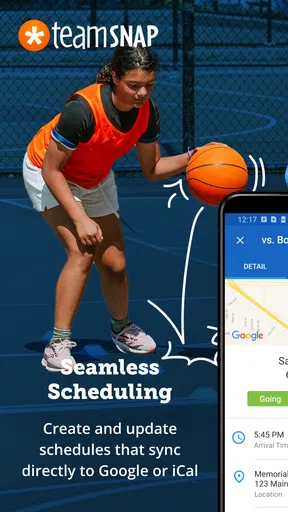
One of my favorite features is the team calendar. It automatically updates with game schedules, practices, and events. No more endless group texts asking, "When's the next game?" It’s all right there in the app. Plus, you can sync it with your personal calendar, which is a game-changer for those of us who are always on the go.
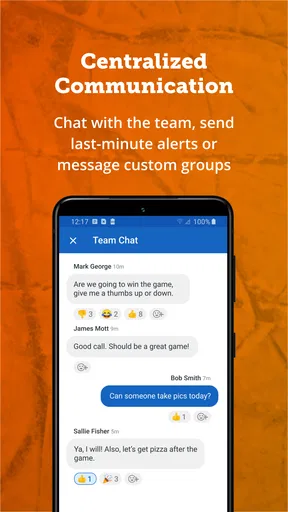
Communication is another area where TeamSnap shines. The built-in messaging system allows for easy group chats or direct messages. Whether you need to remind parents to bring orange slices or let everyone know about a last-minute location change, it's all at your fingertips. No more email chains that get lost in the abyss!
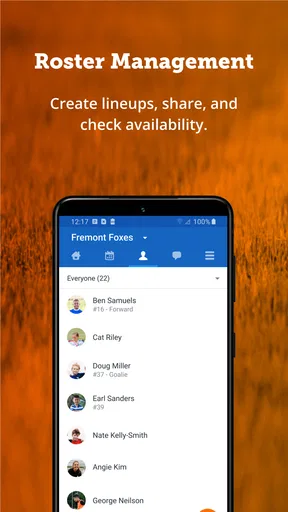
And let's talk about the lineup feature. Coaches can set up game lineups, track player availability, and even keep stats during the game. It’s like having your own personal assistant in your pocket. I can't stress enough how much easier this makes managing a team.
Keeping Everyone in the Loop
We all know how fast plans can change, especially when it comes to kids’ sports. TeamSnap makes sure everyone stays in the loop. The app sends out instant alerts for schedule changes, cancellations, or any other updates. It’s like having a megaphone that reaches your entire team without the shouting.
The availability feature is a lifesaver, too. Players or their parents can mark their availability for games and practices right in the app. This way, coaches know exactly who’s going to show up, eliminating those awkward last-minute surprises.
Use the calendar and replies to reduce sideline confusion
A particularly useful routine is to treat the event entry as the single source of truth. If a field changes, update the event rather than relying only on a fresh message that can be buried by later chat. Then use the availability responses to see whether the change has reached families and whether the lineup needs adjusting. This is a small workflow choice, but it prevents the common problem of a coach working from one plan while parents are still looking at another.
For a typical weekday, imagine a coach learning that practice has moved to a different field just as parents are leaving work. Updating the calendar and sending a short message gives the team both a place to check the details and a prompt to notice the change. A parent can then confirm attendance, check the event later, and avoid searching through a long message thread. That is where the app’s combination of scheduling, alerts, and availability has practical value.
There is a trade-off, though: alerts are helpful only if people notice them and keep notifications manageable. I would still check the event itself before leaving home rather than treating a notification preview as the complete plan. If a family has limited phone access during work or school, a team should agree on a backup for urgent changes instead of assuming every alert will be seen immediately.
Why TeamSnap Makes Life Easier
Honestly, TeamSnap is all about convenience. Gone are the days of paper schedules and forgotten practices. This app brings everything into the digital age, making team management as painless as possible. It’s like having a virtual assistant dedicated to your sports team.
And let’s not forget the financial side of things. TeamSnap also allows for managing payments for uniforms, tournaments, and other expenses. It’s all seamlessly integrated, so you can keep track of who owes what without breaking a sweat.
But what really sets TeamSnap apart is the community aspect. It brings teams, parents, and coaches together in one place. There’s a sense of camaraderie built into the app, making it not just a tool, but a space where everyone can connect and coordinate.
Where it fits—and where a simpler option wins
I think the app is best for a team whose coach or organizer is willing to maintain the schedule and whose families want one place for availability, messages, and team logistics. It is especially useful when more than one adult helps coordinate a child’s commitments: a shared calendar can make it easier for caregivers to check dates without forwarding every text. The lineup and stats tools also make more sense for coaches who actively plan game-day roles than for a group that only needs to announce practice times.
By comparison, a group text is quicker to start and may be enough for a small, informal team, but it is poor at keeping an event schedule easy to find. A shared calendar can handle dates well but lacks the same team-oriented conversation and availability workflow. TeamSnap brings those jobs together, which is convenient when the group will use it; it can feel like extra administration when everyone already has a reliable, agreed-upon system.
I would skip it if you only need occasional reminders, dislike maintaining a dedicated team space, or are joining a group whose coach does not keep its events current. Before relying on payment management, I would also check what your particular team is asking families to pay and how it plans to track those transactions. The app can help organize team expenses, but families should still make sure they understand the team’s payment process rather than assuming that a feature alone settles every question.
Keep control of participation and communication
For parents, one practical way to stay in control is to respond to availability requests as soon as plans are reasonably clear, then revisit the event if circumstances change. Coaches get a more useful picture, and the family is less likely to receive repeated follow-ups. If a player’s plans are uncertain, a timely update or direct note is better than leaving an old response in place and hoping the coach understands.
I would also be deliberate about who needs to receive a message. Group chat is right for field directions or a general equipment reminder; an individual conversation is usually more suitable for a child-specific concern. That distinction keeps the shared space useful and avoids turning routine team coordination into a place for information that does not need to be broadcast.
One question families often have is whether they need to be coaches to benefit. They do not: parents can use the schedule, messages, and availability tools as participants, while coaches have the extra organizational tasks such as lineups. Another is whether the app replaces a personal calendar. It can sync events with one, so I would use the team calendar as the authoritative team schedule and a personal calendar as a convenient way to see those commitments alongside work and family plans.
The remaining decision is whether the group will adopt it consistently. A parent can install the app and still miss information if the coach posts changes elsewhere, while a well-maintained team space can reduce repeated questions. I would ask the organizer how updates and urgent changes will be handled before the season starts; that answer tells you more about the real experience than the feature list alone.
A cautious verdict for youth teams
All in all, TeamSnap is a must-have for anyone involved in youth sports. It simplifies the chaos and keeps everyone connected. Whether you’re managing a soccer team, basketball squad, or any other sport, this app is designed to lighten your load and make team management a breeze.
If you're looking to take the headache out of organizing your team, give TeamSnap a try. It’s like having an all-in-one tool that handles everything you need with a few simple taps. Trust me, once you try it, you’ll wonder how you ever managed without it.
My more cautious recommendation is to try it when a team genuinely needs a shared hub, then judge it by whether the organizer keeps events and communication current. The free app is a sensible starting point, but optional purchases mean I would review any purchase prompt carefully and decide whether it is relevant to the team before paying. For a coach who wants schedules, attendance responses, messages, lineups, and team expenses in one routine, it can earn its place. For a casual group that already coordinates smoothly in a calendar or chat, the extra structure may not be worth asking every family to adopt.
Ultimately, I see its strongest benefit as reducing preventable confusion, not eliminating every last-minute change or communication gap. Keep the team’s expectations clear, verify important details in the event itself, and choose another simpler method if the group will not maintain the app. Used with that realistic approach, TeamSnap can make youth-sports logistics easier without asking families to treat one app as a substitute for clear communication.
Pros
- User-friendly interface simplifies team management.
- Real-time updates keep everyone informed.
- Integrated scheduling avoids double bookings.
- In-app chat enhances communication efficiency.
- Automatic reminders reduce no-shows.
Cons
- Limited features in the free version.
- Occasional sync issues with calendars.
- No offline mode for remote areas.
- Premium cost may be high for small teams.
- Notifications can be overwhelming.
FAQs for TeamSnap: manage youth sports
What is TeamSnap and how does it work?
TeamSnap is an app designed to streamline the management of youth sports teams. It offers features like scheduling, communication, and roster management, allowing coaches, players, and parents to stay organized. Users can update availability, send messages, and manage payments, all within a user-friendly interface on both Android and iOS devices.
How can TeamSnap improve team communication?
TeamSnap enhances communication by providing a centralized platform where coaches can quickly send messages or alerts to the entire team or specific groups. With real-time notifications, parents and players receive updates instantly, reducing miscommunication. The app also supports chat functions for more interactive conversations among team members.
Is TeamSnap free to use, or are there any costs involved?
TeamSnap offers a free version with basic features suitable for small teams. However, there are premium plans available that include advanced features such as enhanced communication tools, statistics tracking, and additional storage. Pricing varies based on the plan and level of functionality needed, making it flexible for different team needs.
Can TeamSnap be used for sports other than youth sports?
Absolutely, TeamSnap is versatile and not limited to youth sports. It can be used for adult recreational leagues, school teams, and any organized sports group. Its functionality supports a wide range of sports and team sizes, making it a valuable tool for any team looking to enhance organization and communication.
What devices and platforms does TeamSnap support?
TeamSnap is available on both Android and iOS platforms, ensuring broad accessibility for users. It can be downloaded from the Google Play Store and the Apple App Store. The app also offers a web version, allowing access from any internet-enabled device, ensuring users can manage their teams on the go.


